July 2026 — Aapne Spotify par kabhi notice kiya hai ki kuch artists ke profile par ek chota sa blue checkmark hota hai? Woh chota sa tick mark actually bahut bada power rakhta hai. Yeh verification badge sirf show-off ke liye nahi hai, balki yeh aapke music career ka ek turning point ho sakta hai. Verified artist ko Spotify par alag tools, alag data, aur alag opportunities milti hain jo unverified artist kabhi imagine bhi nahi kar sakta.
Agar aap ek Indian independent artist hain, singer hain, rapper hain, producer hain, ya kisi bhi tarah ka music create karte hain — toh yeh article aapke liye goldmine hai. Ismein hum poori depth mein samjhenge ki Spotify par artist verification kaise hota hai, kya requirements hain, kaunse common mistakes Indian artists karte hain, aur verification ke baad aapko exactly kya-kya powers milti hain. Saath hi, hum aapke music distribution business The Flyworlds Digital ko bhi naturally link karenge, kyunki verification ke liye pehle aapka music Spotify par officially distributed hona chahiye — aur wahan hum aapki madad kar sakte hain.
Spotify Verification (Blue Checkmark) Kya Hai?
Spotify par jab aap kisi artist ka profile dekhte hain — jaise Arijit Singh, Badshah, Divine, ya Prateek Kuhad — toh unke naam ke aage ek chota sa blue checkmark dikhta hai. Yeh tick mark batata hai ki yeh profile officially verified hai aur isse artist ya unki team directly manage kar rahi hai.
Technically, yeh verification Spotify for Artists platform ke through milta hai. Jab aapka music Spotify par release hota hai (distributor ke through), toh Spotify ek auto-generated artist profile banata hai. Lekin jab tak aap claim nahi karte, woh profile aapke control mein nahi hota. Verification ka matlab hai ki aapne apne artist profile ko claim kar liya hai aur Spotify ne confirm kar diya hai ki aap hi asal artist hain.
Iske alawa, Spotify ne 2024 mein ek naya “Verified by Spotify” badge bhi introduce kiya tha jo kuch selected artists ko milta hai. Lekin generally jab log “Spotify verification” ki baat karte hain, toh woh Spotify for Artists access aur blue checkmark ki baat kar rahe hote hain.
Verification ke baad aap apne profile ko customize kar sakte hain — apni photo lagao, bio likho, social media links add karo, pinned track set karo, aur sabse important — Spotify Editorial Playlists mein pitch kar sakte hain. Yeh woh tools hain jo aapke music career ko next level par le ja sakte hain.
Indian Artists Ke Liye Verification Kyon Zaruri Hai?
India mein music streaming ka scene completely badal chuka hai. 2026 mein Spotify India ke 100+ million active users hain aur yeh number har din badh raha hai. Lekin problem yeh hai ki lakho artists apna music upload kar rahe hain — aur unmein se majority verified hi nahi hain. Isse unhe kya nuksan ho raha hai? Chaliye samajhte hain.
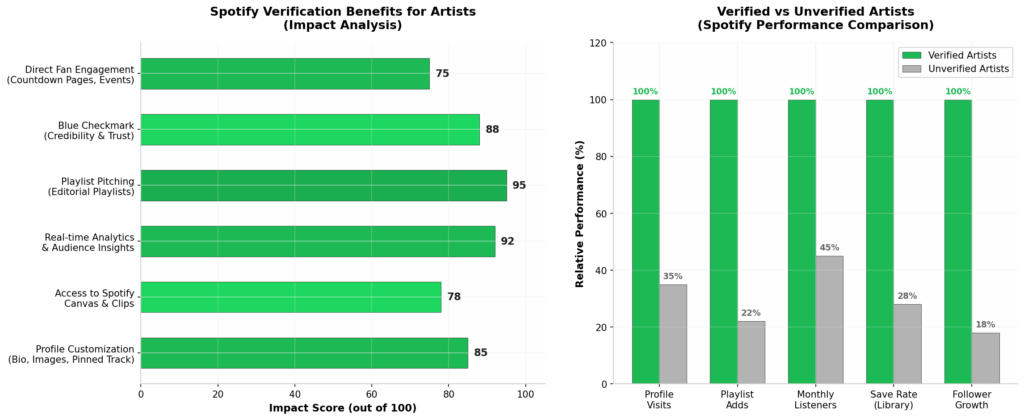
Pehla: Credibility. Jab koi listener aapka profile dekhta hai aur wahan blue checkmark nahi hota, toh unke man mein ek doubt aa jata hai — “Kya yeh asli artist hai ya fake?” Indian market mein trust bahut matter karta hai. Verification se aapka profile professional dikhta hai aur listeners ko confidence milta hai ki yeh official artist hai.
Dusra: Playlist Pitching. Spotify Editorial Playlists — jaise “Mint India,” “Bollywood Butter,” “Indie India,” “Punjabi 101” — yeh woh playlists hain jahan se artists ko millions of streams milti hain. Lekin sirf verified artists hi in playlists mein directly pitch kar sakte hain. Agar aap verified nahi hain, toh aapka music algorithm ke bharose hai — jo ki unpredictable hai.
Teesra: Data & Analytics. Verified artists ko Spotify for Artists dashboard milta hai jisme real-time data hota hai — kaunse cities mein aapke fans hain, kaunse tracks sabse zyada stream ho rahe hain, kaunse playlists mein aapka music add hua hai, aur aapke listeners ki age, gender, aur behavior kya hai. Yeh data aapke touring, marketing, aur content strategy ke liye priceless hai.
Chautha: Fan Engagement Tools. Verification ke baad aap Spotify Canvas (3-8 second looping video for tracks), Clips (short vertical videos), Countdown Pages (for upcoming releases), aur Live Events integration use kar sakte hain. Yeh tools aapke fans ko engage karne ke liye powerful hain.
Panchva: Monetization & Revenue Transparency. Verified artists ko exact data milta hai ki unka music kitne streams par kitna revenue generate kar raha hai. Unverified artists ko yeh transparency nahi milti. India mein jahan per-stream payout already kam hai, wahan har stream count karna zaruri hai.
Spotify Par Artist Verify Karne Ka Step-by-Step Process
Ab baat karte hain sabse important cheez ki — actually verify kaise karte hain. Yeh process thoda technical ho sakta hai, lekin agar aap step-by-step follow karenge, toh koi problem nahi hogi.
Step 1: Apna Music Spotify Par Release Karwana (Pre-Requisite)
Sabse pehle aur sabse zaruri — aapka music Spotify par available hona chahiye. Agar aapka koi track Spotify par nahi hai, toh aap verify hi nahi kar sakte. Music release karne ke liye aapko ek music distributor ki zarurat hoti hai.
Distributors jaise DistroKid, TuneCore, CD Baby, Amuse, ya Indian distributors — yeh aapke music ko Spotify, Apple Music, JioSaavn, YouTube Music jaise platforms par upload karte hain. Process mein usually 3-7 din lagte hain.
Important: Jab aap music distribute karte hain, toh make sure ki aapka artist name exactly same ho har platform par. Agar aapne ek jagah “Rahul Sharma” likha aur dusri jagah “Rahul S.” — toh Spotify alag-alag profiles bana dega aur verification mein problem hogi.
Agar aap music distribution mein confused hain ya sahi distributor choose nahi kar pa rahe hain, toh The Flyworlds Digital se contact karein. Hum aapke music ko Spotify aur global platforms par legally distribute karte hain — proper metadata, ISRC codes, aur artist profile optimization ke saath.
Step 2: Spotify for Artists Par Account Banayein
Jab aapka music Spotify par live ho jaye, toh next step hai Spotify for Artists par account create karna.
- artists.spotify.com par jayein
- “Get Access” ya “Claim Your Profile” par click karein
- Aapke paas do options hain:
- Artist/Manager: Agar aap khud artist hain ya unke manager hain
- Label Team: Agar aap record label se hain
- “Find Yourself” search box mein apna artist name type karein
- Jab aapka profile dikhe, uspar click karein aur “Claim” karein
Step 3: Verification Process Complete Karein
Claim karne ke baad Spotify aapki identity verify karega. Iske liye aapko kuch details provide karni hongi:
- Aapka real name (jo govt. ID se match kare)
- Artist name (jo Spotify par hai)
- Role: Artist, Manager, ya Label Representative
- Government ID (Aadhaar, Passport, ya Driving License — Indian artists ke liye Aadhaar acceptable hai)
- Social media links (Instagram, Facebook, YouTube — jo aapke artist identity ko prove karein)
Spotify usually 3-7 business days mein verification process complete kar deta hai. Kuch cases mein yeh 2 weeks tak bhi le sakta hai agar additional verification required ho.
Step 4: Profile Customize Karein
Verification ke baad aapka Spotify for Artists dashboard active ho jayega. Ab aapko apna profile professional tarike se set up karna hai:
Profile Image: Minimum 2660 x 1140 pixels ki high-quality image lagayein. Yeh aapka first impression hai — blurry ya low-quality photo mat lagayein. Indian artists ke liye suggestion hai ki aap apni personality dikhayein — traditional ya modern, jo aapke music se match karta ho.
Header/Banner Image: Spotify automatically aapke latest release ka artwork as banner use karta hai, lekin aap isse customize kar sakte hain.
Bio: 1500 characters tak ka bio likh sakte hain. Yahan aap apni story bata sakte hain — aap kahan se hain, aapka music ka style kya hai, kya achievements hain. Hinglish mein bhi likh sakte hain agar aapka audience Indian hai. Lekin English bio zyada universal rahega.
Social Links: Instagram, Facebook, Twitter/X, YouTube, Wikipedia, aur aapki official website link karein. Yeh cross-platform discoverability badhata hai.
Artist Pick: Yeh ek special feature hai jisse aap ek specific track, album, ya playlist ko apne profile ke top par pin kar sakte hain. Isse aap apna latest release ya sabse popular track highlight kar sakte hain.
Step 5: Team Members Add Karein (Optional)
Agar aap manager, label representative, ya band member ko apne dashboard ka access dena chahte hain, toh Spotify for Artists mein “Team” section mein unhe invite kar sakte hain. Aap different permission levels set kar sakte hain — Admin, Editor, ya Viewer.
Spotify Verification Requirements – Complete Checklist
Table
| Requirement | Details | Priority |
|---|---|---|
| Music Live on Spotify | At least 1 track distributed via official distributor | 🔴 Must Have |
| Matching Artist Name | Same name across all platforms & distributor | 🔴 Must Have |
| Valid Govt. ID | Aadhaar, Passport, or Driving License | 🔴 Must Have |
| Active Social Media | Instagram/YouTube/Facebook proving artist identity | 🟡 Important |
| Professional Profile Image | Min 2660×1140 px, high quality | 🟡 Important |
| Complete Bio | 150-1500 characters describing your artistry | 🟢 Recommended |
| Official Website (if any) | Adds credibility to verification request | 🟢 Recommended |
| Consistent Branding | Same profile pic across Spotify, IG, YT | 🟢 Recommended |
Indian Artists Ke 7 Common Mistakes (Jo Verification Delay Ya Reject Karwate Hain)
Mistake 1: Fake Streams Ya Bot Activity Kai Indian artists jaldi success chahte hain aur Spotify par fake streams khareed lete hain. Agar Spotify ne detect kar liya ki aapke streams artificial hain, toh aapka verification request reject ho sakta hai — aur aapka music platform se permanently remove bhi ho sakta hai. Organic growth hi sustainable hai.
Mistake 2: Artist Name Inconsistency Agar aapne distributor par “DJ Rahul” likha, Instagram par “Rahul Music,” aur Spotify par “Rahul” — toh yeh confusion create karega. Spotify ko confirm karna mushkil ho jayega ki yeh sab same artist hain. Hamesha exact same name use karein.
Mistake 3: Incomplete Social Media Profiles Verification ke time Spotify aapke social media check karta hai. Agar aapka Instagram private hai, ya sirf 10 followers hain, ya koi music-related content nahi hai — toh yeh red flag ho sakta hai. At least ek active public profile maintain karein jahan aapka music aur artist identity clear dikhe.
Mistake 4: Wrong Category Select Karna Spotify for Artists mein aapko apna role select karna hota hai. Agar aap artist hain toh “Artist” select karein, manager hain toh “Manager.” Galat category select karne se verification delay ho sakta hai.
Mistake 5: Generic Bio Ya No Bio Kai artists verification ke baad bhi apna profile blank chhod dete hain. Yeh unprofessional lagta hai. Apni story likhein — aap kahan se hain, aapka inspiration kya hai, aapne kis label se release kiya hai. Yeh listeners ko connect karne mein madad karta hai.
Mistake 6: Multiple Artists Ek Hi Profile Mein Agar aap alag-alag projects run karte hain (jaise ek solo project aur ek band), toh unke liye alag-alag profiles banayein. Ek profile mein sab kuch mix karne se confusion hota hai aur playlist algorithms affect hote hain.
Mistake 7: Verification Ke Baad Inactive Rehna Kai artists verify ho jate hain aur sochte hain ki ab kaam khatam. Lekin verification sirf shuruaat hai. Regularly naye music release karna, Canvas videos add karna, playlist pitching karna, aur data analyze karna — yeh sab regularly karna padta hai.
Verification Ke Baad Kya Karein? Growth Strategy
Verification milne ke baad aapke paas powerful tools hain — ab unka sahi use karna seekhiye.
Playlist Pitching: Spotify for Artists dashboard mein “Upcoming” tab hota hai jahan aap apne unreleased tracks ko Spotify Editorial team ko pitch kar sakte hain. Yeh 7 days pehle se 3 weeks pehle tak ka window hota hai. Pitch karte time track ka genre, mood, aur story clearly bataein. Indian artists ke liye specifically “Desi Hip-Hop,” “Indie India,” “Bollywood Acoustic,” aur “Punjabi Pop” jaise playlists target karein.
Spotify Canvas: Har track ke saath ek 3-8 second ki looping video lagayein. Yeh vertical format mein hota hai (9:16 aspect ratio). Canvas se track shares 145% zyada hote hain aur playlist adds 20% badh jate hain. Indian artists apne music videos ke clips, behind-the-scenes footage, ya creative visuals use kar sakte hain.
Countdown Pages: Jab aap naya release plan karte hain, toh Countdown Page create karein. Fans pre-save kar sakte hain aur release ke din automatically unke library mein add ho jata hai. Isse first-day streams boost hote hain jo algorithm ko signal deta hai ki yeh track popular hai.
Marquee Campaigns: Yeh paid promotion tool hai jo Spotify verified artists use kar sakte hain. Aap apne new release ko targeted listeners ke home screen par promote kar sakte hain. India mein yeh abhi limited availability mein hai, lekin jaldi expand hone wala hai.
Analytics Use Karo: Spotify for Artists mein “Audience” tab dekhein. Wahan aapko pata chalega ki aapke top cities kaunse hain — agar Mumbai, Delhi, Bangalore aapke top cities hain, toh wahan live shows plan karein. “Source of Streams” se pata chalega ki aapke streams playlists se aa rahe hain ya direct searches se — isse aapki marketing strategy decide hoti hai.
The Flyworlds Digital: Aapka Music Distribution Partner
Ab tak aap samajh gaye honge ki Spotify verification kitna important hai. Lekin sabse pehle aapka music Spotify par officially distributed hona chahiye — aur yeh wahi jagah hai jahan The Flyworlds Digital aapki madad kar sakta hai.
Hum sirf music upload nahi karte. Hum aapko end-to-end support dete hain:
✅ Spotify-Ready Distribution: Proper metadata, ISRC codes, UPC codes, aur artist profile optimization ke saath aapka music global platforms par release karna.
✅ Profile Setup Guidance: Spotify for Artists claim karne mein step-by-step help — taaki aapka verification process smooth ho.
✅ Playlist Pitching Strategy: Kaunse playlists target karein, kaise pitch karein, aur kis time release karein — poora strategy hum banate hain.
✅ Analytics Interpretation: Spotify for Artists ka data samajhna mushkil ho sakta hai. Hum aapko batate hain ki numbers ka kya matlab hai aur aapko agla step kya lena chahiye.
✅ Copyright Protection: Aapke music ko legally protect karna taaki koi bina permission se use na kar sake. Yeh especially important hai jab aap verified ho jate hain aur aapka music zyada visible hota hai.
Agar aap apne music career ko seriously lete hain aur Spotify par ek professional presence banana chahte hain, toh The Flyworlds Digital se aaj hi contact karein. Hum Indian artists ko global platforms par grow karne mein madad karte hain — simple Hinglish mein, bina kisi technical jargon ke.
Spotify Verification Aur YouTube Growth: Dono Saath Mein Kyon Important Hain?
Aapne shayad notice kiya hoga ki successful Indian artists sirf ek platform par depend nahi karte. Divine Spotify par verified hain aur YouTube par bhi millions of subscribers hain. Ritviz Spotify playlists mein hain aur Instagram Reels par viral hain. Hanumankind global Spotify charts par hain aur YouTube par bhi strong presence hai.
Isliye sirf Spotify verification se kaam nahi chalega. Aapko ek multi-platform strategy chahiye. Aur jab baat aati hai YouTube ki, toh aapko yaad hoga ki humne recently ek detailed post likha tha jisme bataya tha ki YouTube Ka Subscription Business Ads Se Bhi Tez Grow Kar Raha Hai — Alphabet Q2 2026 report ke basis par. Wahan humne dekha tha ki YouTube Music aur Premium ki growth 15% hai jo ads se zyada hai.
Iska matlab yeh hai ki Indian artists ke liye ab sirf Spotify hi nahi, balki YouTube Music + Spotify + JioSaavn — teeno platforms par strong presence banana zaruri hai. Verification sirf ek platform par nahi, har major platform par karni chahiye. YouTube par Official Artist Channel claim karna, Spotify par blue checkmark lena, aur Instagram par Meta Verified hona — yeh sab aapke overall digital brand ko strong banata hai.
Frequently Asked Questions (FAQs)
Q1: Kya Spotify verification ke liye minimum followers ya streams chahiye? Nahi. Spotify ne officially koi minimum requirement nahi rakha. Lekin aapka music platform par available hona chahiye aur aapki identity verify honi chahiye. Lekin practically, agar aapka music live hai aur aapki social media presence hai, toh verification mil jata hai.
Q2: Verification ke liye kitna time lagta hai? Usually 3-7 business days. Lekin busy seasons mein ya agar additional documents required hain, toh 2-4 weeks bhi lag sakte hain.
Q3: Kya verification free hai? Haan, Spotify for Artists aur verification completely free hai. Koi bhi aapko verification ke paise maange, toh woh scam hai.
Q4: Agar mera music distributor change kiya, toh verification chala jayega? Nahi. Verification aapke artist profile se juda hota hai, distributor se nahi. Lekin make sure ki new distributor par bhi same artist name aur metadata ho.
Q5: Kya band ke sab members ko alag-alag verification chahiye? Band ek single artist profile ke taur par verify hota hai. Individual members apne solo projects ke liye alag profiles bana sakte hain.
Q6: Spotify Canvas kaise banayein? Canvas 3-8 second ka vertical video (9:16) hota hai. Aap apne music video ka clip, behind-the-scenes footage, ya Canva/Adobe Premiere mein custom animation bana sakte hain. Spotify for Artists app se directly upload kar sakte hain.
Bottom Line
Spotify verification sirf ek blue checkmark nahi hai — yeh aapke music career ka ek important milestone hai. Isse aapko professional tools, valuable data, editorial playlist access, aur fan engagement features milti hain jo unverified artists se aapko alag khade karte hain.
Indian music scene mein competition bahut zyada hai. Roz naye artists aa rahe hain, naye tracks release ho rahe hain. Is bheed mein stand out karne ke liye aapko har advantage chahiye — aur Spotify verification usmein se sabse basic aur sabse powerful advantage hai.
Process simple hai: music distribute karo, Spotify for Artists par claim karo, identity verify karo, aur profile professional set up karo. Lekin iske baad kaam khatam nahi hota — regular releases, playlist pitching, data analysis, aur fan engagement — yeh sab regularly karna padta hai.
Agar aapko music distribution, profile optimization, ya digital growth strategy mein help chahiye, toh The Flyworlds Digital aapke saath hai. Hum Indian artists ko global music platforms par successfully grow karne mein madad karte hain.
Aapka Spotify profile verify hai? Agar nahi, toh aaj se hi process shuru karein. Aur agar already verified hain, toh comments mein batayein ki verification ke baad aapke streams mein kya difference aaya!
Note: Yeh article Spotify for Artists official documentation, Music Business Worldwide, Billboard, aur verified industry sources par based hai. Saari steps aur requirements July 2026 ke according accurate hain.